


Chargers & Cables
Guides
How Many Watts Do You Need to Charge a Laptop?
How many watts to charge a laptop? See the wattage MacBook Air, MacBook Pro, Dell XPS, iPad and Switch need, how to calculate charger watts, and what to buy.

Most thin-and-light laptops charge properly with 45W to 65W, 14-inch performance laptops want around 70W to 100W, and big 16-inch machines need 100W to 140W. The simplest answer to how many watts to charge a laptop is this: match or beat the wattage printed on the charger that came in the box. Go lower and the laptop still charges over USB-C, just slowly, and it may drain while you work.
This guide shows why an underpowered charger causes that frustrating "plugged in, not charging" moment, how to work out the wattage from any label in about ten seconds, why the cable quietly matters too, and a reference table covering MacBook Air, MacBook Pro, Dell XPS, iPad and Nintendo Switch. Mazer has designed chargers in Singapore since 2010 for more than 500,000 customers, all backed by a 24-month warranty, so the table maps each device to a charger we would actually hand a friend.
The Problem: Plugged In, Still Draining
It is 4pm in a co-working space at one-north. Your 14-inch laptop is exporting a video, the fan is audible, and the battery icon says "plugged in" while the percentage keeps sliding. The charger is a 30W phone brick you grabbed on the way out. It is working. It just cannot keep up.
Laptops draw power for two jobs at once: running the machine and refilling the battery. Light work like email might use 10W to 20W. Heavy work like exporting, gaming or running several external displays can pull far more than that. If the charger supplies less than the laptop is using, the battery covers the gap and slowly drains. Nothing is broken. It is maths.
The good news is that USB-C laptops are forgiving. Apple's guide to using a power adapter with your Mac confirms you can charge with any USB-C adapter "even if it provides higher or lower wattage", and recommends using at least the wattage of the adapter Apple suggests for that model. A higher-wattage charger is safe, because the laptop only draws what it needs.
How to Calculate the Watts of a Charger
Flip any charger over and squint at the tiny grey print. You are looking for the output line, not the input line. Input will say something like "100-240V 50/60Hz", which is just the mains range. Output is the useful part.
Watts are volts multiplied by amps. A USB-C charger usually lists several profiles, such as "5V 3A / 9V 3A / 15V 3A / 20V 3.25A". Take the highest pair: 20V times 3.25A is 65W. A line like "20V 5A" means 100W, and "28V 5A" means 140W. Those 28V and higher profiles are part of USB Power Delivery 3.1, which the USB-IF says enables up to 240W over USB-C.
Check your laptop's own adapter first
Your laptop's original charger is the best clue. Its output line tells you the wattage the manufacturer designed for. If it says 65W, a 65W USB-C PD charger is a like-for-like replacement, and anything higher simply adds headroom for a phone on a second port.
How Many Watts to Charge a Laptop: Device Reference Table
Here is the cheat sheet. Wattages for Apple Macs come from Apple's recommended adapters. Other figures reflect the adapters these devices ship with or the minimum the maker recommends, so always cross-check the label on yours.
| Device | Recommended or bundled wattage | Comfortable charger size | Suggested Mazer option |
|---|---|---|---|
| MacBook Air 13-inch and 15-inch (2022 or later) | 30W (13-inch only), 35W, 67W or 70W | 65W | GaNPrestige Slim 65W ($43.90 SGD) |
| MacBook Pro 14-inch (2021 or later) | 67W, 70W or 96W | 100W or more | AiPrestigeGaN 140W ($169.90 SGD) |
| MacBook Pro 16-inch (2021 or later) | 140W | 140W (PD 3.1, 28V) | AiPrestigeGaN 140W ($169.90 SGD) |
| Dell XPS 13 (recent models) | 60W USB-C | 65W | GaNPrestige Slim 65W ($43.90 SGD) |
| Dell XPS 14 and 16 | 100W to 130W USB-C, depending on configuration | 100W to 140W | AiPrestigeGaN 140W ($169.90 SGD) |
| iPad (USB-C models) | 20W adapter | 20W to 35W | PrestigeGaN V6 35W ($19.90 SGD) |
| Nintendo Switch 2 | 54W or more (Nintendo guidance) | 65W | GaNPrestige Slim 65W ($43.90 SGD) |
Table: How many watts common laptops, tablets and consoles need, mapped to a Mazer charger (Apple and Nintendo figures from their support pages)
A note on the Switch 2. Nintendo's support guidance says that if you do not have the official adapter, "an AC adapter with an output of 54W or more can be used", while also warning that unlicensed products may have compatibility problems. You can read it on Nintendo's support page. The original Switch is less demanding and charges comfortably from a 45W or 65W USB-C PD charger.
Quick checklist for choosing laptop charger wattage
- Original adapter: match or exceed the wattage printed on the charger that came with your laptop.
- Workload: add headroom if you edit video, game or run external monitors, because heavy work draws more power.
- Second device: if you charge a phone at the same time, check the multi-port split, not just the total.
- Cable rating: use a 5A e-marked USB-C cable for anything above 60W, or the charger is capped at 60W.
- Travel pins: if you fly often, choose a charger with interchangeable plugs so one brick works abroad.
Picking the Right Wattage for Your Laptop Setup
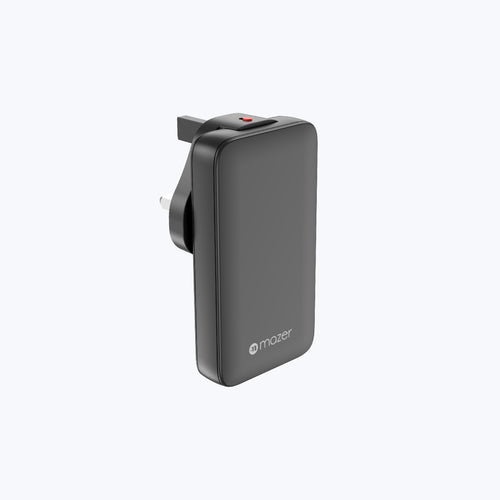
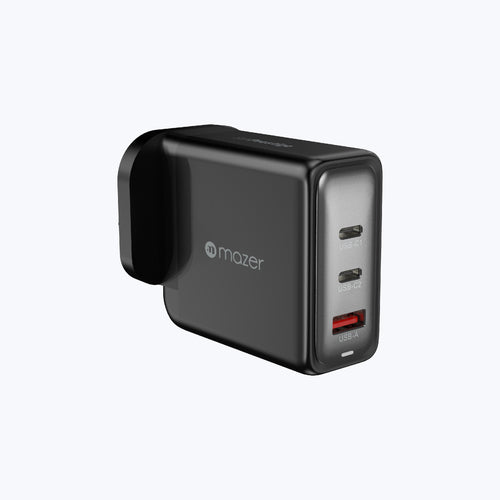
Most people overthink this. If you own a MacBook Air or a 13-inch Windows ultrabook, 65W is the sweet spot. Fast enough to charge while working, small enough for a tote bag, and enough left over to top up a phone.

GaNPrestige Slim 65W with travel pins, a fit for MacBook Air and 13-inch laptops
The GaNPrestige Slim 65W ($43.90 SGD) delivers up to 65W from its USB-C port, with interchangeable UK, EU and AU pins for travel. Plug a phone into its USB-A port as well and it splits 45W to the laptop and 12W to the phone.
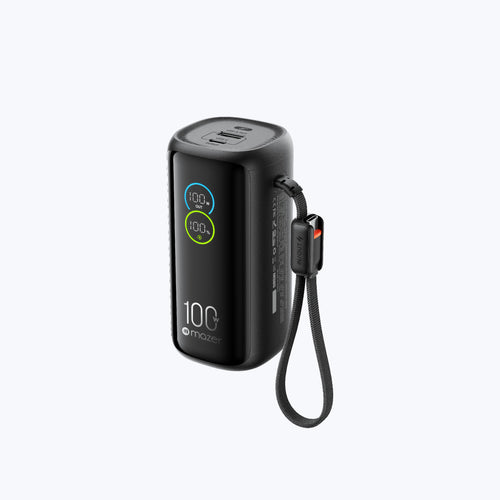
Running a 16-inch MacBook Pro, a Dell XPS 16 or a creator laptop? Then you need a charger that speaks PD 3.1. The AiPrestigeGaN 140W ($169.90 SGD) supports a 28V at 5A profile, so a single USB-C port delivers the full 140W. With two laptops or a laptop and tablet connected, it splits 100W and 35W. Its built-in smart display gives a live read on charging, which is a handy way to confirm your laptop is really getting what you paid for.

AiPrestigeGaN 140W with AI display, for 16-inch and high-power laptops
A quick note on the middle ground: our GaNPrestige 100W GaN Wall Charger, a natural match for a 14-inch MacBook Pro, is currently sold out, so it is worth checking back. Until then, the 140W model covers that laptop with room to spare.
The Bottom Line on How Many Watts to Charge a Laptop
Start with the number on your laptop's original adapter. Match it for normal charging speed, go higher for headroom and multi-device use, and go lower only if you accept slower charging. For most MacBook Air and ultrabook owners, 65W is the answer. For 16-inch machines, 140W with PD 3.1 is the honest minimum for full-speed charging under load. Whatever you choose, pair it with a cable rated for the wattage. Browse every wattage, from 20W phone chargers to 200W desktop stations, in our chargers collection.
TL;DR
To work out how many watts to charge a laptop, check the output on its original adapter and match or exceed it: around 65W for MacBook Air and ultrabooks, 100W for 14-inch pro laptops, and 140W for 16-inch models. A lower-wattage USB-C charger still works, only slower.
Frequently Asked Questions about Laptop Charger Wattage
Straight answers to the wattage questions we hear most from laptop owners in Singapore.
1. How many watts do I need to charge a laptop?
Most thin laptops need 45W to 65W, 14-inch performance laptops need about 70W to 100W, and 16-inch laptops need 100W to 140W. The safest rule is to match or exceed the wattage of the adapter that came with your laptop.
2. How do I calculate the wattage of a charger?
Multiply the output voltage by the output current printed on the label. For example, 20V at 3.25A equals 65W, and 20V at 5A equals 100W. Use the highest output profile listed, not the input line.
3. Can I use a higher-wattage charger on my laptop?
Yes. A USB-C PD charger only supplies the power the laptop requests, so a 140W charger on a laptop designed for 65W is safe. The laptop simply draws what it needs, and the extra capacity can serve a second device.
4. What happens if my laptop charger wattage is too low?
The laptop still charges, but slowly, and under heavy use it may drain even while plugged in. Some laptops show a "slow charger" warning. Nothing is damaged; the charger simply cannot supply as much power as the laptop is using.
5. Is 65W enough for a MacBook Air?
Yes. Apple recommends adapters from 30W to 70W for MacBook Air models introduced in 2022 or later, so a 65W USB-C PD charger charges a MacBook Air at close to full speed, with spare capacity if the charger has a second port.
6. Is a 100W charger good for a laptop?
A 100W charger suits most laptops, including 14-inch pro models, and charges smaller laptops with headroom to spare. It needs a 5A e-marked USB-C cable to deliver its full output. For 16-inch laptops that use 140W, it charges more slowly.
7. How many watts is a Samsung travel adapter?
Samsung's common travel adapters are rated 25W for Super Fast Charging and 45W for Super Fast Charging 2.0, with older models at 15W. A 25W adapter is designed for phones and is too low to charge most laptops at a useful speed.
8. Does fast charging wattage matter for laptops?
Yes. Higher wattage lets a laptop charge quickly while also powering demanding work. Below the laptop's needs, it charges slowly or drains under load, so fast charging wattage is the single most important spec when choosing a USB-C laptop charger.
Get 15% off your first order
Sign up to the Mazer mailing list for 15% off your first order. You will also get practical charging guides, like which wattage suits your next laptop, straight to your inbox.
About Mazer
Founded in 2010, Mazer is a Singapore-based brand trusted by over 500,000 customers, with 1.8M+ units sold, offering high-quality, smarter, and eco-friendly technology designed for everyday life #mazer
Shop this guide
More guides like this

Join our community
Get early access to new products, exclusive deals, and free product trials.