


Chargers & Cables
Chargers & Cables
What Is a PD Charger? USB Power Delivery Explained Simply
What is a USB-C PD charger? See how USB Power Delivery negotiates voltage, what 20W to 240W means, why cables matter, and the wattage your devices need.

A PD charger is a USB-C charger that supports USB Power Delivery, an open standard that lets the charger and your device agree on the right voltage before any real power flows. That handshake is why one USB-C PD charger can top up an iPhone, an iPad and a MacBook safely, each at its own speed. If a charger says "PD" and lists a wattage, it is speaking the same language as almost every modern phone, tablet and laptop.
This guide skips the engineering lecture. You will see what actually happens when you plug in, what the numbers on the label mean, why your cable matters more than you think, and how to tell what wattage you need. We have been designing chargers in Singapore since 2010, and with more than 500,000 customers and a 24-month warranty on our products, these are the questions we answer at the counter every week.
The Problem: Same USB-C Plug, Very Different Charging Speeds
You borrow a colleague's USB-C charger at the office in Raffles Place. Your phone charges fine. Your laptop shows a little lightning bolt, then sits at 41 percent for the whole afternoon. Same plug shape, same cable, completely different result.
That confusion is the reason USB Power Delivery exists. The USB-C connector is just the shape of the plug. It says nothing about how much power travels through it. Before PD became common, chargers either pushed a basic 5V to everything or used a brand-specific fast charging trick that only worked with that brand's phones. Mix and match, and you got slow charging at best.
A USB-C PD charger fixes this by turning charging into a short conversation. The device asks for what it can handle, the charger confirms what it can supply, and only then does the voltage step up. No conversation, no extra power. It is a polite system, honestly. More polite than most MRT queues at 6pm.
What the handshake looks like in plain terms
When you plug in, the charger starts at a safe 5V. Your phone then reads the list of "power profiles" the charger offers, such as 9V at 3A or 20V at 3.25A, and requests the one that suits its battery and temperature at that moment. If the phone warms up, or the battery is nearly full, it can ask for less. The charger follows. That is why a 65W PD charger will not force 65W into a phone that only wants 20W.
How a USB-C PD Charger Decides the Voltage
Look at the small print on any decent charger and you will see a row like "5V 3A / 9V 3A / 15V 3A / 20V 3.25A". Those are the fixed voltage levels PD uses. Multiply volts by amps and you get watts, so 20V at 3.25A is 65W, and 9V at 3A is 27W.
The standard power range in USB PD tops out at 20V and 5A, which is 100W. According to the USB-IF's USB Power Delivery page, earlier PD "was limited to 100W using a solution based on 20V using USB Type-C cables rated at 5A." The newer PD 3.1 revision adds Extended Power Range (EPR) with fixed 28V, 36V and 48V levels, unlocking 140W, 180W and up to 240W for big laptops and gaming machines.
| PD voltage level | Max power at that level | Typical devices that use it |
|---|---|---|
| 5V | Up to 15W (3A) | Earbuds, smartwatches, older phones |
| 9V | Up to 27W (3A) | iPhones and Android phones fast charging |
| 15V | Up to 45W (3A) | iPads, tablets, Nintendo Switch |
| 20V | 60W at 3A, 100W at 5A | MacBook Air, most ultrabooks, MacBook Pro 14-inch |
| 28V (PD 3.1 EPR) | Up to 140W (5A) | 16-inch MacBook Pro, larger creator laptops |
| 36V and 48V (PD 3.1 EPR) | Up to 180W and 240W (5A) | Gaming laptops and high-power workstations |
Table: USB Power Delivery fixed voltage levels and what they are typically used for (source: USB-IF)
PPS: the fine-tuning layer
Programmable Power Supply, or PPS, is an optional part of PD 3.0 and later. Instead of jumping between fixed steps, a PPS charger can adjust voltage in small increments, which lets the phone manage heat more precisely during the fastest part of a charge. Samsung's Super Fast Charging relies on PPS, so a Galaxy owner should look for "PPS" on the spec sheet, not just "PD". iPhones use standard PD and do not need PPS.
Why Your Cable Is Half the Story
Here is the bit most people miss. A 100W charger with a cheap cable is a 60W charger. USB-C cables without a special identification chip are limited to 3A, so at 20V they stop at 60W. To go above 3A, the cable needs an electronically marked (e-marked) chip that tells the charger "I can safely carry 5A". Every 100W and 240W cable should have one.
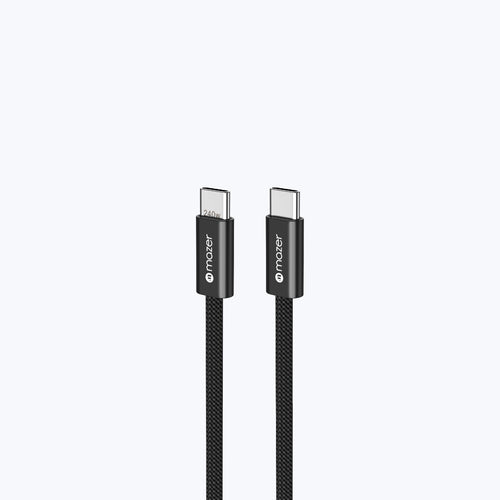
The giveaway is usually the packaging. If a cable lists 60W, it is a 3A cable. If it says 100W or 240W, it should be e-marked. Our InfiniteFLEX2 Pro 240W braided USB-C cable has an e-marker chip and supports PD 3.1, and at $9.90 SGD it is the cheapest way to stop a good charger being held back by a tired cable from the bottom of your drawer.
Quick checklist before you buy a USB-C PD charger
- PD on the label: look for "PD" or "Power Delivery" printed on the charger or spec sheet, not just "fast charging".
- Single-port wattage: check the maximum output from one USB-C port, because that is what your laptop can actually use.
- Multi-port split: read how the wattage divides when two or three devices charge at once.
- PPS support: if you use a Samsung Galaxy phone, confirm PPS is listed for Super Fast Charging.
- Cable rating: pair anything above 60W with an e-marked 100W or 240W USB-C cable.
- Plug fit: make sure the plug suits a Type G socket at home and has travel pins if you fly often.
Picking the Right USB-C PD Charger Wattage
Picture a typical Singapore work-from-home desk in an HDB flat: a phone, a pair of earbuds and a 13-inch laptop sharing one power point. You do not need a separate brick for each. You need one PD charger with enough headroom for the hungriest device, plus a sensible split for the rest.
Apple's guidance is a good benchmark. Its fast charging page for iPhone lists a 20W adapter or higher for models like the iPhone Air, and 40W or higher for the iPhone 17 line. Its Mac power adapter guide recommends 30W to 70W for a MacBook Air introduced in 2022 or later, 67W to 96W for the 14-inch MacBook Pro, and 140W for the 16-inch MacBook Pro. Apple also notes you can charge a Mac with a higher or lower wattage USB-C adapter. A lower one just charges more slowly.

AiPrestigeGaN 65W with AI Display, a three-port USB-C PD charger
For most people, 65W is the sweet spot. Our AiPrestigeGaN 65W with AI Display ($59.90 SGD) delivers up to 65W from a single USB-C port, using fixed PD levels from 5V up to 20V at 3.25A. With two USB-C devices plugged in it splits 45W and 20W, which covers a MacBook Air and an iPhone at the same time. The small screen shows live port usage and temperature, which sounds like a gimmick until the day you want to know why your laptop is charging slowly. It weighs 127g.
If you run a 16-inch MacBook Pro or a high-power Windows laptop, you need an EPR charger. The AiPrestigeGaN 140W ($169.90 SGD) supports PD 3.1 with a 28V at 5A profile, so a single USB-C port can deliver the full 140W that Apple recommends.
One Standard, Fewer Bricks in Your Bag
USB Power Delivery is the reason a single charger can now replace three. It negotiates instead of guessing, it scales from earbuds to 140W laptops, and it works across Apple, Samsung, Google and Windows devices without brand lock-in. Get the wattage right for your largest device, use an e-marked cable when you go above 60W, and the rest takes care of itself. If you want one USB-C PD charger for desk and travel, the AiPrestigeGaN 65W handles a phone and a laptop together, and you can compare every wattage in our full chargers collection.
TL;DR
A USB-C PD charger uses the USB Power Delivery standard to negotiate a safe voltage with each device, from 5V for earbuds up to 20V for laptops, and 28V to 48V under PD 3.1. Match the charger's single-port wattage to your hungriest device, and use an e-marked cable for anything above 60W.
Frequently Asked Questions about PD Chargers
Short, direct answers to the questions people in Singapore search most about USB Power Delivery charging.
1. What is a PD charger?
A PD charger is a USB-C charger that supports USB Power Delivery, a standard where the charger and device negotiate voltage before charging. This lets one charger safely power phones, tablets and laptops, each at the speed it is designed for.
2. Is a USB-C PD charger safe for my iPhone?
Yes. iPhones from the iPhone 8 onwards use USB Power Delivery for fast charging, and the phone only requests the power it can handle. A 65W PD charger will not push 65W into an iPhone; the phone draws what it needs.
3. What is the difference between PD and PPS?
PD uses fixed voltage steps such as 5V, 9V, 15V and 20V. PPS is an optional extension that adjusts voltage in small increments for finer heat control. Samsung Super Fast Charging needs PPS, while iPhones charge at full speed with standard PD.
4. Can I use a PD charger with a non-PD device?
Yes. Every USB PD charger starts at a basic 5V, which any USB device can accept. A device that cannot negotiate PD simply charges at standard speed, so plugging older earbuds or a smartwatch into a PD charger is safe.
5. How many watts is a USB-C PD charger?
It ranges widely, from 20W phone chargers to 240W under PD 3.1. Standard PD tops out at 100W (20V at 5A), while Extended Power Range adds 28V, 36V and 48V levels for 140W, 180W and 240W.
6. Do I need a special cable for a 100W PD charger?
Yes. Charging above 60W requires a USB-C cable rated for 5A with an e-marker chip. Without it, the charger limits current to 3A, which caps output at 60W even if the charger itself is rated higher.
7. Is a fast charging adapter the same as a PD charger?
Not always. "Fast charging adapter" is a marketing term that can mean USB PD, Qualcomm Quick Charge or a brand-specific system. A PD charger follows the open USB-IF standard, so it works across Apple, Samsung, Google and Windows devices.
8. Can a PD charger damage my laptop battery?
No, a certified PD charger only supplies the voltage the laptop requests, and the laptop's own charging circuit controls the current into its battery. Heat and long periods at 100 percent affect battery health more than the charger's wattage rating.
Get 15% off your first order
Join the Mazer mailing list and get 15% off your first order, plus clear, no-jargon guides like this one on charging, cables and travel power. It is a good moment to swap that drawer of old bricks for one USB-C PD charger that does it all.
About Mazer
Founded in 2010, Mazer is a Singapore-based brand trusted by over 500,000 customers, with 1.8M+ units sold, offering high-quality, smarter, and eco-friendly technology designed for everyday life #mazer
Shop this guide
More guides like this

Chargers & Cables
Best Chargers for iPad and Tablets in Singapore

Chargers & Cables
Best Chargers for MacBook Air and MacBook Pro in Singapore
Join our community
Get early access to new products, exclusive deals, and free product trials.